Wow, so it's been a few months since I actually posted anything here.
I'm now living in Morgantown, WV, working in the physics department at WVU.
Here are a few notes on things I've had to do;
1) Get myself put into the payroll system. That took a while, and involved having to get a bank account (first of all), a social security number, and then waiting for them to put me in the database. That took a while, but was completed BEFORE I started work. So far so good. However, even once you're in the system, you have to wait a month before your first pay cheque, which is not so nice when you've been living in a hotel and paying money left right and centre as part of moving. Luckily I had some savings, but anyone straight from a PhD is advised to borrow whatever they can from relatives or whatever.
2) Get an apartment. This was relatively easy. I got the local paper and read through the apartment listings. I only viewed two places, the first was disgusting, but the second was nice and that's where I'm living. Rent is really cheap here compared to the UK, but be prepared to pay a deposit AND your last month's rent up front. Again, without being paid for at least a month, "Ouch".
3) Driving license. Contrary to popular belief, you cannot exchange a UK license for a WV license. So I'm in the process of doing the WV driving test at the moment. Hopefully I can do that soon. Your other option is using your UK or whatever license, but you can only use it for a maximum of 90 (non-consecutive) days per calendar year.
4) TV and Internet. Necessity. I'm with Comcast but I'm probably being ripped off. Internet is fast though, and plenty of channels.
5) Phone. I was originally thinking of getting a contract to get a nice handset, but the cost of a contract here, with smart phone, is huge compared to the UK, and with a brand-new social security number, comes a crappy credit rating (ie. no rating at all). So I've gone with Virgin Mobile, and pay $35 a month, no contract, and get unlimited messaging and data, and about 300 minutes. Plenty for me. I had to pay $150 upfront for the handset, but the cost per month is so low that I didn't mind this expense. And I still have a smart phone, which I couldn't live without anymore (LG Optimus V, which has every feature I need -- I don't play games on my phone, I have a DS and a PS3 for that).
6) Entertainment. Walmart is your friend. I bought a PS3 and TV and haven't looked back. I rented a car for a couple of days to do all this purchasing and that helped with settling in.
Well, I've been gaming a lot recently, I might try to post on that soon, I also have a small GShock project which I'm going to experiment with as soon as the parts arrive. I will post that too.
Enjoy!

Wednesday, 9 November 2011

Saturday, 9 July 2011
New beginnings...?

Well, I can now pretty openly discuss the fact I'm leaving my current job and moving to Morgantown, West Virginia for at least 2 years. I've accepted a post-doctoral research position at West Virginia University, located in Morgantown, and will be continuing with pulsar-based research.
While this is the kind of oportunity I've always hoped I'd be getting, I'm quite sad to be leaving my current job. There's no research involved, which is a downer, but I've discovered a bit of brains and a knack for learning as you go (which I've "developed" / got by with over the 7 years since I started university) is a good combination for a software programmer. I've learned a lot of stuff in a short time, and I think I was proving pretty good at the job.
However, this IS the kind of job I've wanted to do, so I'm going to give it my best shot and see if I get offered another after that! Right now, I'm working my notice period and trying to organise myself for leaving the country. Step one for now is getting some reading material. For that, I bought a Kindle (see image :D )! I'm pretty excited about actually using it in anger and getting the benefits of an eBook device.
Unfortunately, earlier in the year I also bought a stack of paper books - which I'm trying to make my way through. Hopefully I can do this before I travel, otherwise the Kindle will be somewhat wasted. Fortunately, at least, I bought all the books at bargain prices so if I leave them behind or whatever then it's not the end of the world.
Anyway, Kindle FTW - I've downloaded about 15 books so far, and not spent a single penny. I've been stocking up on those classics I've never read - and mostly ones I've wanted to; if I don't like them, well, I didn't pay.
First impressions are great. The screen is even crisper than I remember from my sister's Kindle, and the contrast is really awesome, and there is no "ghosting" (that's my term, I'm sure there's a real one!) when the screen updates in book mode. I've noticed a little of this when selecting things from menus etc, but since the primary function is as a book, this doesn't bother me too much.
That's that for now, but hopefully I'll keep this blog well maintained over the next couple of years as I'm sure I'll have lots to rant about!
Tuesday, 26 April 2011
Generate SQL Server Scripts With Visual Studio
So for about 3 months now I've been working at an IT consultancy as a an analyst/programmer working mainly with Micro$oft technologies. They're far more powerful than I care to admit, but as soon as I get the chance to jump ship back to Unix development, I probably will.
A little useful hint came up recently, however, that might be of use to random googlers. So here we go. I'm currently developing a web app for an un-named client, which must interface with a SQL Server 2008 database.
During the course of developing the web app, I've made ad-hoc changes to the database and not adapted my SQL scripts and raw data files at the same time (bad practice I know, but what's done is done).
But not a problem, surely I can just use SQL Server 2008 Management Studio to generate new SQL scripts to create and populate the database? Well, maybe you can, but I couldn't find it. A quick google suggests this feature has been removed, at least from the 2008 Express Edition.
However, there IS an option to produce these scripts using Visual Studio Web Developer (See the screenshot below, suitably blurred just in case anyone actually cares about the origin or nature of this work).
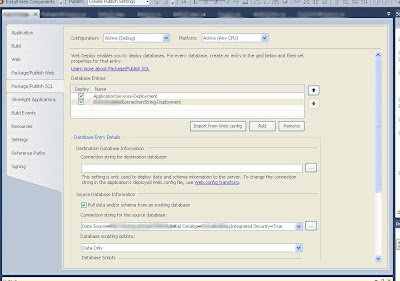
In the app properties menu, in the Package/Publish SQL tab, you can select "Data only", "Tables only" or "Tables and data" from the Database Scripting Options menu. Make sure that you do this with the correct database selected towards the top of the pane (in the Database Entries box). When you come to publush your app, Visual Studio will then produce useful scripts that can be used by colleagues or the sys admin on-site to reproduce the database exactly as it is on your dev machine. Job done.
A little useful hint came up recently, however, that might be of use to random googlers. So here we go. I'm currently developing a web app for an un-named client, which must interface with a SQL Server 2008 database.
During the course of developing the web app, I've made ad-hoc changes to the database and not adapted my SQL scripts and raw data files at the same time (bad practice I know, but what's done is done).
But not a problem, surely I can just use SQL Server 2008 Management Studio to generate new SQL scripts to create and populate the database? Well, maybe you can, but I couldn't find it. A quick google suggests this feature has been removed, at least from the 2008 Express Edition.
However, there IS an option to produce these scripts using Visual Studio Web Developer (See the screenshot below, suitably blurred just in case anyone actually cares about the origin or nature of this work).

In the app properties menu, in the Package/Publish SQL tab, you can select "Data only", "Tables only" or "Tables and data" from the Database Scripting Options menu. Make sure that you do this with the correct database selected towards the top of the pane (in the Database Entries box). When you come to publush your app, Visual Studio will then produce useful scripts that can be used by colleagues or the sys admin on-site to reproduce the database exactly as it is on your dev machine. Job done.
Monday, 18 April 2011
Return
Well it's been a while since I blogged. I've got my PhD, and a job, and I hope to blog more regularly. I've got a few things in my brain that I'd like to discuss when I'm a bit less busy, but for now, check out this awesome post on cracked.com
I love movies, especially the ones with big effects (maybe not *especially*, but I love sci-fi, and what sci-fi flick is complete without some explosions etc?). That post discusses several big action sequences that were done *without* any CGI. Impressive huh?
That iconic scene from Independance Day blew me away when I saw it, but I never thought they'd done it for real. Blown away, literally.
That's all for now.
I love movies, especially the ones with big effects (maybe not *especially*, but I love sci-fi, and what sci-fi flick is complete without some explosions etc?). That post discusses several big action sequences that were done *without* any CGI. Impressive huh?
That iconic scene from Independance Day blew me away when I saw it, but I never thought they'd done it for real. Blown away, literally.
That's all for now.
Sunday, 13 February 2011
Word web

Well I submitted my PhD thesis late last year, and had my viva just a couple of weeks ago...
(I passed!)
So while I work on my minor corrections, which are due pretty soon, here's a nice image of the words which crop up in my thesis abstract (courtesy of wordle). As you can see, the words 'pulsar', 'survey' and 'millisecond' crop up regularly - due to my project being a survey for millisecond pulsars. Once these corrections are done, then I'll probably post my whole thesis up here for no-one to read.
Sunday, 26 December 2010
atoi do it yourself
This interesting post came up on my twitter feed today. Given it's the holidays and I have now finished my PhD, I don't know why I read it, but I did.
You can find it here
But in essence this is a discussion on how to convert a string to an int without making use of the built-in tools to do this - in fact, in Python, this is usually as simple as casting;
a = "1234"
b = int(a)
but in this blog we are shown how to use the ord method to get the int value of each character, then multiply by 10, 100, 1000 etc depending on the position in the string.
Happy Christmas everyone!
Tuesday, 14 December 2010
Some other discoveries from today, which I forgot to mention...
These are all software related, and since I'm a mac user, they're all mac applications, which came via the cult of mac top 50 mac applications.
One: Caffeine - this little program sits in your menu bar doing nothing - until you click it. Then, activated, it will prevent the screensaver coming on, or the screen dimming, until you click the icon again. Perfect for watching an iPlayer or other long video.
Two: Coconut-battery - this app gives a full breakdown of not only the charge on your battery, but the battery condition relative to when you purchased your mac. A great little tool, especially on the older macs which didn't come with a battery "for life" like the new ones do.
As you can tell, today isn't the most productive.
Subscribe to:
Comments (Atom)